
What is Cross-Origin Resource Sharing?
Cross-origin resource sharing (CORS) is a mechanism for integrating applications. CORS defines a way for client web applications that are loaded in one domain to interact with resources in a different domain.
CORS는 브라우저의 보안 정책으로, 다른 출처(origin)에서 오는 HTTP 요청을 제어하는 메커니즘이다.
This is useful because complex applications often reference third-party APIs and resources in their client-side code. CORS allows the client browser to check with the third-party servers if the request is authorized before any data transfer.
실제 데이터를 전송하기 전에 브라우저가 먼저 third-party 서버에게 요청이 허용되는지 확인한다.
Why is cross-origin resource sharing important?
In the past, when internet technologies were still new, cross-site request forgery (CSRF) issues happened. These issues sent fake client requests from the victim’s browser to another application. To prevent such CSRF issues, all browsers now implement the same-origin policy.
과거에는 CSRF(Cross-Site Request Forgery) 공격이 문제가 되었다. 예를 들어
- 사용자가 은행 사이트에 로그인
- 악성 사이트에서 사용자의 쿠키를 몰래 사용해 은행 서버에 요청 전송
- 은행 서버는 정상 사용자 요청인 줄 알고 처리하여 피해 발생
이를 막기 위해 Same-Origin Policy를 도입했다.
Same-Origin Policy
Today, browsers enforce that clients can only send requests to a resource with the same origin as the client’s URL.. The protocol, port, and hostname of the client’s URL should all match the server it requests.
Same-Origin Policy는 동일한 출처인 경우만 요청을 허용한다. 이때 프로토콜 + 도메인 + 포트가 모두 같아야 동일 출처(Same-Origin)로 간주한다.
For example, consider the origin comparison for the below URLs with the client URL
http://store.aws.com/dir/page.html.
| URL | Outcome | Reason |
|---|---|---|
http://store.aws.com/dir2/new.html | Same origin | Only the path differs |
http://store.aws.com/dir/inner/other.html | Same origin | Only the path differs |
https://store.aws.com/page.html | Different origin | Different protocol |
http://store.aws.com:81/dir/page.html | Different origin | Different port (http:// is port 80 by default) |
http://news.aws.com/dir/page.html | Different origin | Different host |
http와https는 다른 프로토콜이므로 다른 출처(origin)로 간주한다.http://store.aws.com은 기본적으로80포트를 사용한다.:81은 포트 번호가 다르므로 다른 출처로 간주한다.news.aws.com은 도메인(host)가 다르므로 다른 출처로 간주한다.
Same-Origin Policy는 보안 측면에서 우수하지만, 외부 API, 외부 데이터 등 third-party 리소스를 사용할 수 없다는 한계가 있다. Third-party에 대한 접근을 허용하기 위해서는 same-origin policy를 확장한 CORS 정책이 필요하다. 동일한 출처 외에도 서버가 명시적으로 허용한 출처에 한하여 요청을 허용한다.
How does cross-origin resource sharing work?
일반적으로 브라우저는 서버에 HTTP 요청을 보내고, 응답을 받아 화면에 표시한다. 이때 현재 브라우저의 URL을 current-origin, 요청 대상인 외부 URL을 cross-origin이라고 한다.
Cross-origin 요청이 발생하면 아래와 같은 순서로 진행된다.
- 브라우저 서버
- 브라우저가 요청에
Origin헤더를 추가한다. - 이 헤더에는 current-origin의 프로토콜, 호스트, 포트 정보가 담긴다.
- 브라우저가 요청에
- 서버 브라우저
- 서버가
Origin헤더를 확인한다. - 요청한 데이터와 함께
Access-Control-Allow-Origin헤더를 담아 응답한다.
- 서버가
- 브라우저 클라이언트 앱
- 브라우저가 응답 헤더를 확인한다.
- 허용된 origin이면 데이터를 클라이언트 앱에 전달한다.
- 만약 서버가 cross-origin 접근을 허용하지 않는다면 에러 메시지를 응답한다.
즉, 브라우저가 서버와 먼저 cross-origin의 허가 여부를 주고받은 후에 실제 데이터를 전달받을 수 있다.
What is a CORS preflight request?
일반적인 CORS 동작에서는 브라우저가 요청과 access control 헤더를 동시에 전달한다. 주로 GET과 같은 요청은 위험도가 낮기 때문이다.
하지만 일부 복잡한 요청은 실제 요청을 전송하기 전에 먼저 서버의 허가를 받아야 한다. 이러한 사전 허가 과정을 preflight request라고 한다.
Complex cross-origin requests Cross-origin requests are complex if they use any of the following: - Methods other than GET, POST, or HEAD - Headers other than Accept-Language, Accept, or Content-Language - Content-Type headers other than
multipart/form-data,application/x-www-form-urlencoded, ortext/plain
데이터를 삭제하거나 수정하는 요청이 complex request의 대표적인 예이다.
Content Type이 application/json인 경우도 complex request에 해당한다. 따라서 REST API 요청은 거의 항상 preflight가 발생한다. (서버에서 CORS 설정을 제대로 해야 함.)
How preflight requests work
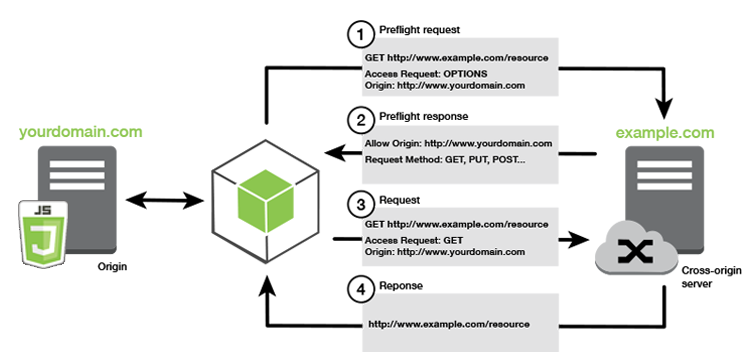
- 브라우저 서버
- 브라우저가 preflight request를 생성하고, 실제 요청 메시지를 보내기 전에 접근 허용 여부 확인을 요청한다.
- Preflight request에는 cross-origin 정보와 서버에 요청하고자 하는 작업에 대한 정보(Method, Header)가 포함된다.
OPTIONS /data HTTP/1.1
Origin: https://example.com
Access-Control-Request-Method: DELETE
- 서버 브라우저
- 서버는 브라우저에게 서버가 허용하는 Origin, Method, Header를 응답한다.
Access-Control-Allow-MethodsAccess-Control-Allow-HeadersAccess-Control-Allow-Origin
- 서버는 브라우저에게 서버가 허용하는 Origin, Method, Header를 응답한다.
HTTP/1.1 200 OK
Access-Control-Allow-Origin: https://news.example.com
Access-Control-Allow-Methods: GET, DELETE, HEAD, OPTIONS
Access-Control-Allow-Headers: Content-Type
- 브라우저 서버
- Preflight 통과 후에 실체 요청이 전송된다.
Access-Control-Max-Age
The preflight response sometimes includes an additional Access-Control-Max-Age header. This metric specifies the duration (in seconds) for the browser to cache preflight results in the browser. Caching allows the browser to send several complex requests between preflight requests. It doesn’t have to send another preflight request until the time specified by max-age elapses.
서버 응답에 Access-Control-Max-Age 헤더가 포함되면, 브라우저는 preflight 결과를 지정된 시간 동안 캐시한다. 따라서 같은 요청을 반복할 때 새로운 preflight request를 보내지 않아도 된다.
What are some CORS best practices?
서버에서 CORS 설정 시 다음과 같은 사항을 유념해야 한다.
1. Define appropriate access lists
Avoid using wildcards unless you want to make the API public. Otherwise, using wildcards and regular expressions may create vulnerabilities.
와일드카드(*)나 정규 표현식(regular expression) 사용은 보안 상 취약할 수 있으므로 피하는 것이 좋다.
예를 들어 *.permitted-website.com을 허용하면 maliciouspermitted-website.com도 허용될 수 있다.
따라서 실제로 사용하는 출처만 명시적으로 열어두는 것이 좋다.
참고로 쿠키, 세션과 같은 인증 정보를 포함한 요청은 allowCredentials(true)를 사용한다. 이는 와일드카드와 함께 사용할 수 없으므로 반드시 출처를 명시해야 한다.
2. Avoid using null origin in your list
파일 요청 또는 local host의 요청 등 일부 상황에서 브라우저가 null을 Origin으로 보내는 경우가 있다.
하지만 null을 허용 목록에 넣으면 의도치 않은 접근이 허용될 수 있으므로 피해야 한다.
In Practice
PR: CORS setAllowedOrigins 추가
Problem
기존 CorsConfigurationSource의 setAllowedOrigins 리스트에는 로컬 개발 origin과 https://team-po.cloud만 등록되어 있었다.
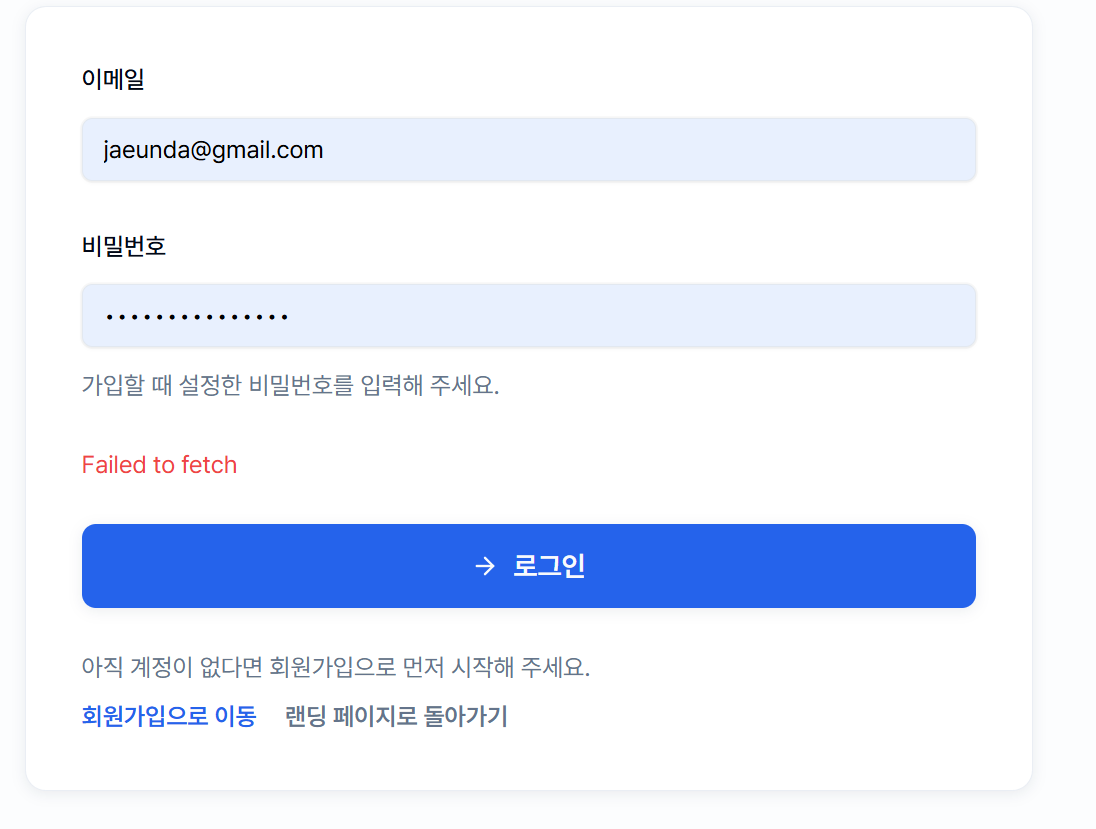
https://www.team-po.cloud로 접속 자체는 가능하지만, 해당 Origin에서 발생하는 REST API 호출은 CORS 허용 목록에 없기 때문에 Preflight 요청과 인증이 포함된 요청이 컨트롤러에 도달하기 전인 브라우저/보안 필터 단계에서 차단된다. 서버 API 자체는 정상이어도 프론트엔드에서는 로그인, 회원가입, 데이터 조회 같은 요청이 CORS 에러로 실패한다.
Changes
setAllowedOrigins 리스트에 https://www.team-po.cloud를 추가하였다.
Why This Approach
해당 서비스는 JWT를 Authorization 응답 헤더로 전달하며, Cross-Origin 환경에서 클라이언트가 이 헤더를 읽을 수 있도록 setExposedHeaders와 allowCredentials(true)를 함께 사용한다. 이 경우 와일드카드 방식을 사용할 수 없으므로 필요한 origin을 명시적으로 추가하는 방식을 선택했다.
configuration.setAllowedOrigins(List.of(
			"http://localhost:5173",
			"http://localhost:3000",
			"https://team-po.cloud",
			"https://www.team-po.cloud"
		));
		configuration.setAllowedMethods(List.of("GET", "POST", "PUT", "PATCH", "DELETE", "OPTIONS"));
		configuration.setAllowedHeaders(List.of("Authorization", "Content-Type", "Accept"));
		configuration.setExposedHeaders(List.of("Authorization"));
		configuration.setAllowCredentials(true);
		configuration.setMaxAge(3600L);